🗓️ 15 Year In Pixels Bullet Journal
& CRAFT IDEAS
Beginner-friendly tutorials, creative projects,
and weekly inspiration in your inbox.
🛠️ The Ultimate Maker's Toolkit
I've tested thousands of craft tools over the years. Whether you are quilting, crafting, or building mixed-media art, these are the top 5 absolute non-negotiable tools I personally recommend to guarantee professional results.
🪡 SINGER Heavy Duty 4452 Sewing Machine
The sewing community highly recommends this as the ultimate "bulletproof" entry-level machine. Its heavy metal frame powerfully pushes through thick denim and heavy quilt layers that would instantly jam a standard plastic machine.
✂️ Fiskars 8" Orange-Handled Scissors
Never settle for dull dollar-store blades. Wirecutter repeatedly names Fiskars the absolute best all-purpose craft scissor due to its legendary precision-ground blades and an ergonomic grip that prevents hand-cramping.
🔥 Gorilla Dual Temp Hot Glue Gun
Named Wirecutter's top choice because it literally does the work of two tools. It features dual-temperature settings offering low heat for delicate florals and blistering high heat for heavy wood adhesion repairs.
🖌️ Mod Podge Waterbase Gloss Sealer
The absolute undisputed champion of decoupage and paper crafts. Experts rely exclusively on this exact water-based formula because it glues, seals, and finishes beautifully without yellowing or flaking over time.
🎨 Apple Barrel Acrylic Paint (2 oz)
The quintessential, incredibly inexpensive craft paint. Woodworkers and hobby painters swear by its smooth flow and matte finish, providing massive value and remarkably thick color coverage on rough surfaces.
You know that mood spiral you swear you’ll track but forget by day three? A Year in Pixels fixes that with pixels, colors, and zero guilt. It’s like a vibe check you can actually stick to. Grab your pen, pick your palette, and let’s make your feelings look cute.
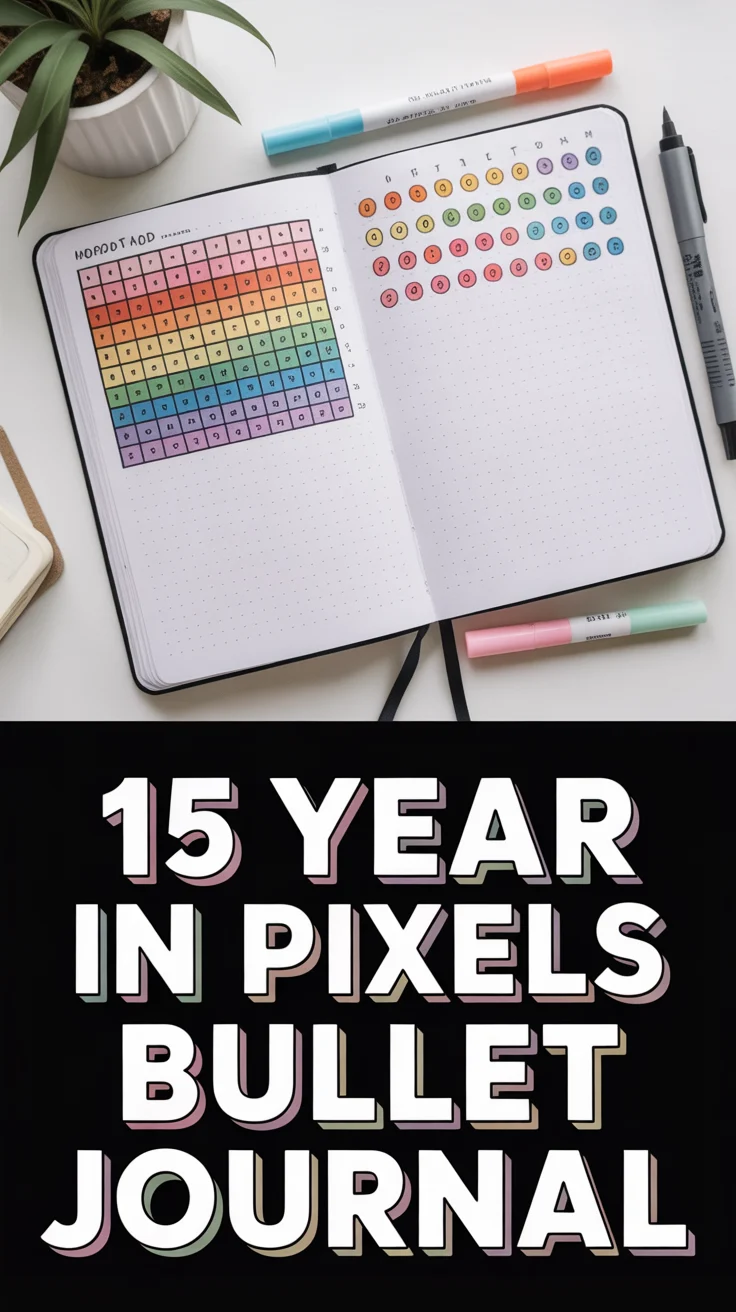
1. Classic Mood Grid
Clean, simple, and timeless. A 12-by-31 grid that turns your year into a colorful mosaic.
- Key points: One square per day, one color per mood, legend at the top.
- Benefits: Minimal setup, maximum clarity.
Pro tip: Use a high-contrast palette so the colors pop even on gloomy days. It works because the simplicity keeps you consistent.
2. Mini Calendar Blocks
Each month gets its own teeny calendar, like a mood flipbook.
- Key points: 12 small grids, consistent color key across months.
- Benefits: Easy to scan patterns by month.
Pro tip: Add a tiny dot for secondary emotions on extra-spicy days. It works by separating months, so overwhelm stays low.
3. Gradient Mood Spectrum
Ditch random colors and go full gradient from calm to chaotic.
- Key points: Light-to-dark palette matches energy levels.
- Benefits: Faster mood tagging, less overthinking.
Pro tip: Assign neutrals to “meh” days to keep dramatic tones meaningful. It works because your brain loves visual order.
4. Habit-Mood Combo Grid
Track moods and one key habit in the same square. Multitask without the meltdown.
- Key points: Color for mood, small icon or corner dot for habit.
- Benefits: Connects cause and effect.
Pro tip: Pick one habit that impacts mood most, like sleep. It works by showing triggers at a glance.
5. Seasonal Quadrants
One quadrant per season, four mini mosaics, big picture clarity.
- Key points: Divide the grid into spring, summer, fall, winter.
- Benefits: See seasonal mood shifts instantly.
Pro tip: Slightly tweak the palette per season for vibe consistency. It works by aligning feelings with your environment.
6. Emoji Pixel Key
Make it cute with emoji-coded moods. Your grid becomes a pixelated diary.
- Key points: Small emoji next to the color legend.
- Benefits: Faster recall, more fun.
Pro tip: Keep emojis minimal to avoid chaos. It works because visual shorthand sticks.
7. Energy vs Mood Split
Two colors per square: mood and energy. Because happy-tired is a thing.
- Key points: Split squares diagonally for dual data.
- Benefits: Nuanced tracking without extra space.
Pro tip: Use warm tones for energy, cool tones for mood. It works by separating vibes from stamina.
8. Weekly Rows
Organize pixels by weeks, not months. Perfect for routine lovers.
- Key points: 52 rows, 7 columns.
- Benefits: Weekly trends jump out.
Pro tip: Add a tiny line break between weeks for visual breathing room. It works by matching how we plan life.
9. Trigger Tags
Add tiny corner markers for triggers like weather, work, or sleep.
- Key points: Symbols in corners, color stays for mood.
- Benefits: Causation clues without clutter.
Pro tip: Limit to three tags max. It works by keeping signals clear and readable.
10. Monthly Palette Swap
Fresh colors every month to keep motivation alive.
- Key points: Same mood meanings, new shades per month.
- Benefits: Prevents boredom, sparks creativity.
Pro tip: Keep a master legend page so you don’t confuse July joy with March chaos. It works by refreshing your attention.
11. Pixel and Quote Pair
One pixel for mood, one micro-quote per week for context.
- Key points: Add a weekly note strip beneath the grid.
- Benefits: Memory jog without long journaling.
Pro tip: Keep quotes to one line. It works by blending data with meaning.
12. Symptom Overlay
If health impacts mood, layer tiny symbols for symptoms or pain levels.
- Key points: Mood color first, small dot scale for intensity.
- Benefits: Helps you advocate at appointments.
Pro tip: Use the same dot position for each intensity to stay consistent. It works by turning anecdotes into evidence.
13. Goal-Linked Pixels
Tie pixels to monthly goals so progress feels less vague.
- Key points: Add a sidebar with one focus goal and a weekly check.
- Benefits: Measures how goals affect mood.
Pro tip: Use arrows to mark weeks with major wins. It works by reinforcing momentum.
14. Color-by-Weather Add-on
Track weather influence because sunshine isn’t just a personality.
- Key points: Tiny weather icon under each week.
- Benefits: Spot patterns like rainy-day slumps.
Pro tip: Keep icons monochrome to avoid color collisions. It works by linking external factors to mood shifts.
15. Reflection Heatmap
Turn your monthly reflections into a mini heatmap next to the grid.
- Key points: One column per month, darker = stronger overall mood.
- Benefits: Macro summary without rereading everything.
Pro tip: Use the same palette as your main grid for consistency. It works by compressing the story into one glance.
Conclusion
Your Year in Pixels is basically mood data dressed for a party. Keep it simple, keep it colorful, and let patterns do the talking. With tiny daily taps, you’ll get big-picture clarity and a journal you’ll actually open. Low effort, high insight, zero perfection required.
& CRAFT IDEAS
Beginner-friendly tutorials, creative projects,
and weekly inspiration in your inbox.